How to Build a Useful WhatsApp Channel in Nigeria
A useful WhatsApp Channel in Nigeria needs a clear subject, a recognisable identity and a reliable update rhythm before it needs more members. Publish a welcome update, prepare several helpful posts and test the public channel link. Boostrify lists a Nigerian WhatsApp Channel members option, but membership does not mean every person reads each update, saves your number or becomes a customer.
Choose a channel, not a group, for broadcast updates
WhatsApp Channels are designed for one-way updates from people and organisations. Meta describes Channels as separate from personal chats and says followers’ choices are not visible to other followers. That makes a Channel suitable for a local bulletin, creator update, deal feed, school announcement stream or association news service.
A group serves a different purpose. Groups are built around member conversation and require active moderation. A Channel is a better fit when the main job is publishing organised updates. Do not submit a group invitation, personal chat link or phone number to a service that asks for a Channel sharing link.
Define the promise in one sentence
People should know what they will receive before they follow. Write a simple channel promise:
This Channel helps [audience] get [type of update] about [subject or area] at [reasonable frequency].
A hypothetical Ibadan community publisher could use: “This Channel helps residents find verified weekend events and public notices in Ibadan, with three concise updates each week.” A Nigerian fashion retailer may promise stock notices and practical sizing updates instead. These are examples, not customer results.
Avoid vague claims such as “everything you need to know”. Narrow coverage makes it easier to maintain quality and helps followers decide whether the Channel is relevant.

Prepare the Channel before promotion
Someone opening the Channel for the first time should understand it quickly. Check the name, image, description and recent updates. Publish enough useful material to show what the Channel will become, without filling it with repetitive posts.
Your first set can include:
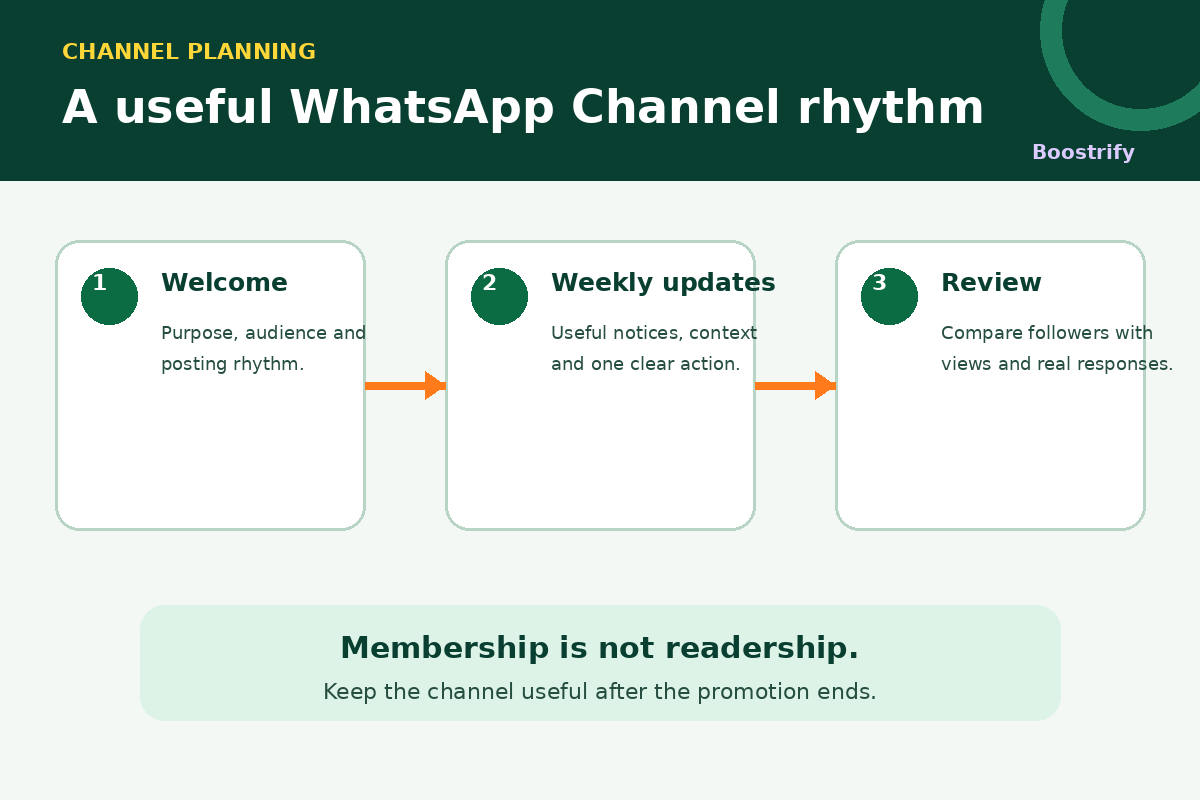
- Welcome update: explain the subject, audience and intended schedule.
- Useful example: publish the type of notice or resource people can expect.
- Context post: explain how information is selected or verified.
- Action post: give one relevant link, date or contact route.
- Correction policy: tell followers how important changes will be marked.
Do not publish a feed of isolated flyers. Add a short line explaining why each update matters, who it is for and what the person should do.
Build a realistic weekly rhythm
A schedule is useful only if you can maintain it. Choose two or three repeatable categories rather than promising constant updates.
| Day | Update type | Editorial check |
|---|---|---|
| Tuesday | Practical notice or opportunity | Confirm date, location and source |
| Thursday | Short explainer or checklist | Keep the advice specific and current |
| Saturday | Weekend round-up | Remove cancelled or expired items |
This is an illustrative rhythm, not a platform rule. A stock-alert Channel may post when inventory changes. A school bulletin may post around the academic calendar. Choose a cadence that matches the value of the information.
Use the correct Channel link
The current Boostrify guide names a Channel sharing link as the required destination. It explicitly distinguishes that link from a group invitation, chat link or phone number. Copy the Channel link from the intended destination and test it outside your administrator account.
Check that the link:
- opens the correct Channel;
- shows the intended name and identity;
- does not lead to a group or private conversation;
- works on a phone where you are not signed in as the admin; and
- will remain unchanged while the order is active.
Separate membership from readership
A member quantity changes the Channel’s follower count according to the selected service. It does not promise views on a particular update, reactions, link clicks, contact saves or private messages. Record those outcomes separately where they are available.
Meta says Channel updates can receive emoji reactions and that forwarded updates include a link back to the Channel. Those are native product behaviours, not guaranteed outcomes from a Boostrify member order. In 2025, Meta also announced promoted Channels and subscriptions in the Updates tab, with a gradual rollout. Availability may vary, so check the current WhatsApp interface rather than building a plan around a feature you cannot access.
Use a small review table:
- starting and ending member count;
- updates published during the period;
- available views or reactions by update;
- link visits or responses in your own system; and
- topics that should be repeated, corrected or stopped.
Do not call every member an active reader or a Nigerian customer. An audience label describes the service listing, not each person’s intent or purchase behaviour.
Keep privacy and permission clear
A Channel is not permission to add people to a separate mailing list or send unrelated private messages. Meta says Channels protect personal information of admins and followers and keep Channels separate from chats. Keep your own next steps transparent. If an update links to a form, explain what information the form collects and why.
For community publishing, confirm information before posting. Do not publish private phone numbers, sensitive photographs or unverified accusations. If a notice changes, correct it clearly rather than silently leaving outdated information in circulation.
Order through Boostrify with the current terms
Before ordering, open the current Channel members guide and confirm the live price, minimum, maximum, accepted link and delivery notes. Service details can change. Choose a quantity that fits a controlled test and your actual publishing capacity.
Boostrify’s terms say destinations must be public, duplicate orders for the same link should not be placed before completion, and usernames, links or IDs should not be changed while an order is active. They also say start times can vary and purchased engagement is not guaranteed to be permanent. Save the Channel link, selected service, quantity and order ID.
Common Channel mistakes
- Promoting an empty Channel: new visitors cannot judge its value.
- Using a group link: the destination does not match the service.
- Posting only sales messages: followers have little reason to return between offers.
- Leaving expired notices live without correction: trust falls when details are unreliable.
- Treating member count as readership: the report hides whether updates were useful.
- Promising daily posts you cannot sustain: the Channel becomes inconsistent.
Your next move
Write the Channel promise, publish a useful welcome and prepare the next three updates. Test the sharing link, then compare the live Channel member option with other destinations in the Boostrify service guides. Keep organic usefulness, corrections and honest measurement at the centre of the Channel after the promotional order closes.
